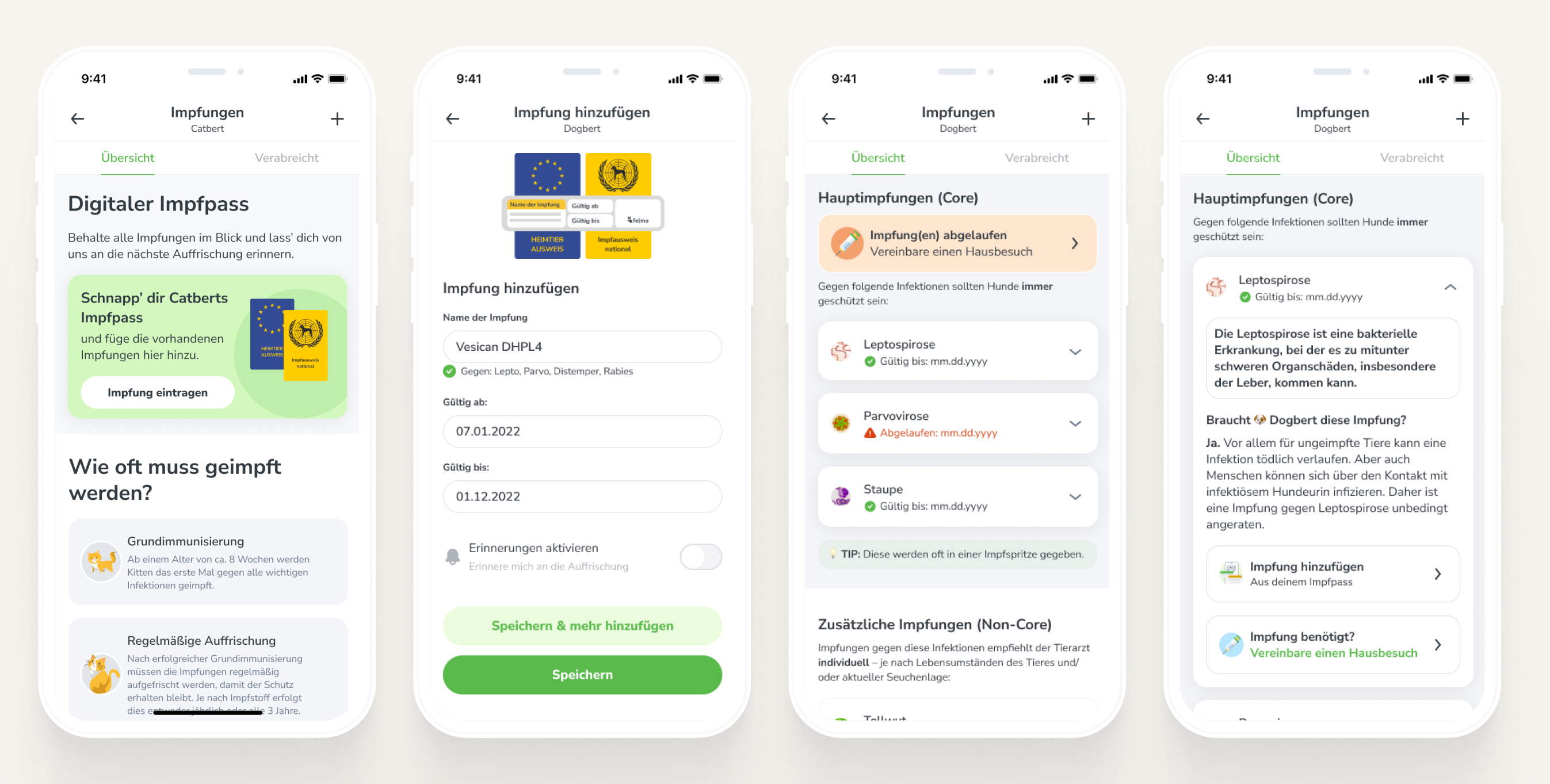
A redesign of the vaccination diary
How we improved the vaccine diary in the felmo mobile app
Elevator-pitch style, what is felmo?
Felmo is a mobile vet, meaning we offer various veterinary services conveniently and stress-free at customers’ homes. With the free native app, you can easily keep track of appointments, medical findings, medications & reminders, while also using it as an educational tool to learn how to best keep your pet healthy in between vet visits.
Background:
Even though nearly 30% of all appointments are for vaccines, our vaccination app feature has not been updated in years. Unfortunately, it is not because it is amazing… we get constant feedback that the vaccine diary is lacking oversight and functionality. Additionally, only 2.5-3.5% of active users actually use the diary.

Goals:
- Increase amount of vaccination appointment bookings
- Increase the percentage of AAU with vaccination entry to 30%
Before:
The process
1. Starting at the beginning
Well, the time has finally come where we decided to prioritize this feature. The main reason for this new priority is that we think we can use this area more optimally, specifically to increase appointment bookings for vaccines.
This is where I came into the project: I was briefed by the product head that we would like to revamp this feature to increase the feature usage & retention, while also resulting in more appointments being booked.
Naturally, as any good designer would… I opened a miro board to start collecting notes and brainstorming ideas. Since I began at felmo, I’ve wanted to get my hands on this feature… and as a cat owner myself (or should I say, as someone who is OWNED BY CATS), I have lots of ideas.
I’ll be lying if I said things went smoothly at the beginning. I started by taking screenshots of the app currently, and then uploading some screenshots from a couple of competitor apps. It was at this moment that I realized this feature was going to be a monster, and that it wasn’t going to be a 4-day quick redesign like I initially thought
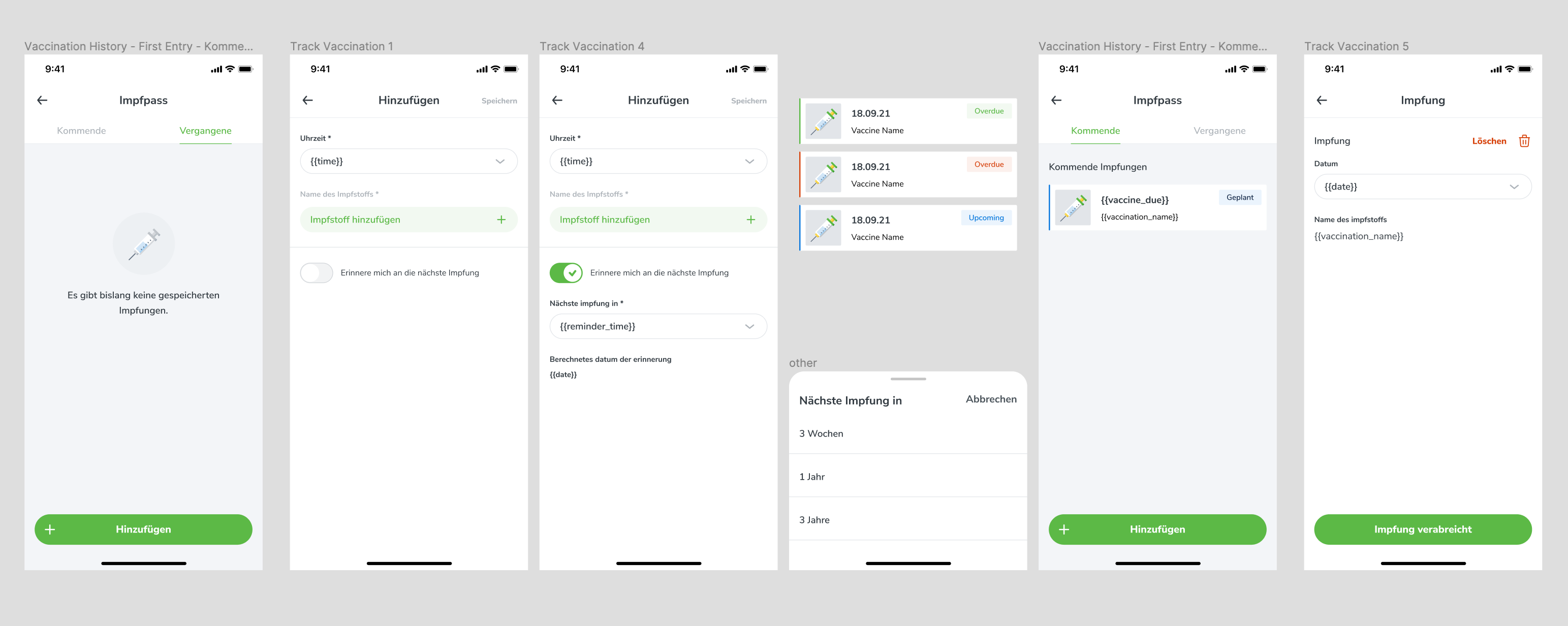
^ the “old” vaccination diary
2. Defining the problem
- We just drop the users on the vaccination screen, and if they have never entered a vaccine or booked an appointment, it’s just empty without any info of what and when they need to vaccinate against.
- Competitors do this well: show that a vaccine is missing, and then help guide users to add it.
Lack of Status:
- When adding a vaccine, there is a ‘good from’ date, but no ‘good until’ date. This means that we don’t tell users when their vaccine is expiring or expired… we just assume the user is going to figure it out.
Unintelligent Reminders:
- Because of the lack of status, we don’t send smart reminders. We allow users to decide on an interval they want reminder push notifications, but this requires the user to already know what they need.
- As the vet and keepers of health knowledge, we should (and do) already know the info and should be the ones who set up the reminders, personalized for each use case.
Lack of Appointment CTA:
- One of our goals is to get people to book more appointments, and we currently have no option for users to book a vaccination from this screen.
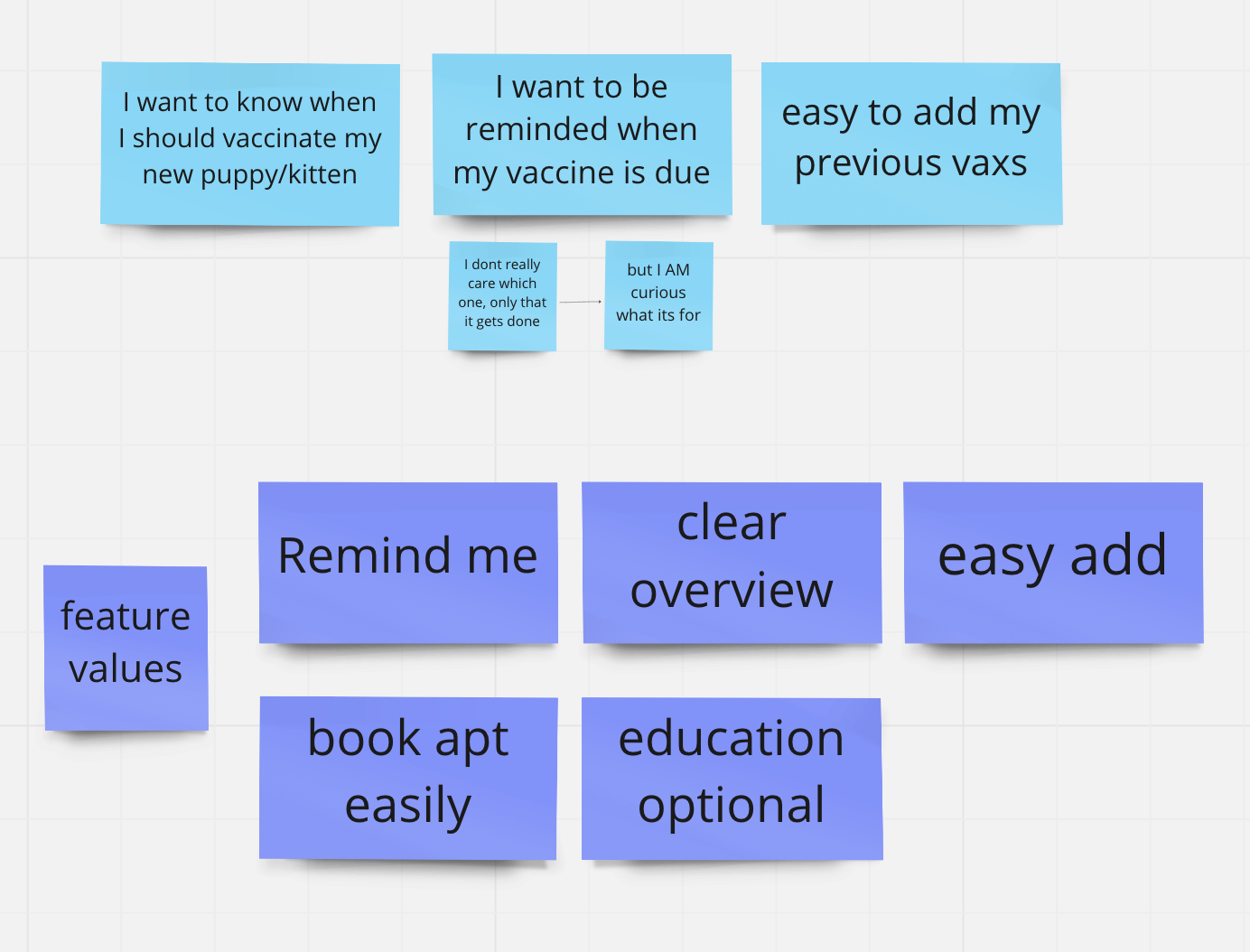
Now that I have a more clear understanding of the feature and the problems, I put together some quick user needs and feature values. I always do this when working on a bigger feature, as this helps me frame my solutions and ensure that I’m taking my ideas in the right direction.
These are not normally shared with other stakeholders, so I just write using language that is clear to me… I’d rather not waste time making it pretty or sound smart, since this is just a tool I use.
The next part of my process: talking to some people! I made some assumptions based on my personal experience, but OF COURSE I’d be a terrible designer if I didn’t talk to other pet-parents. Luckily, at felmo, we have a lot of employees who have pets… so I just asked around the office and got some quick background. I wanted to understand how much people know about vaccines currently, and potentially what they would need.
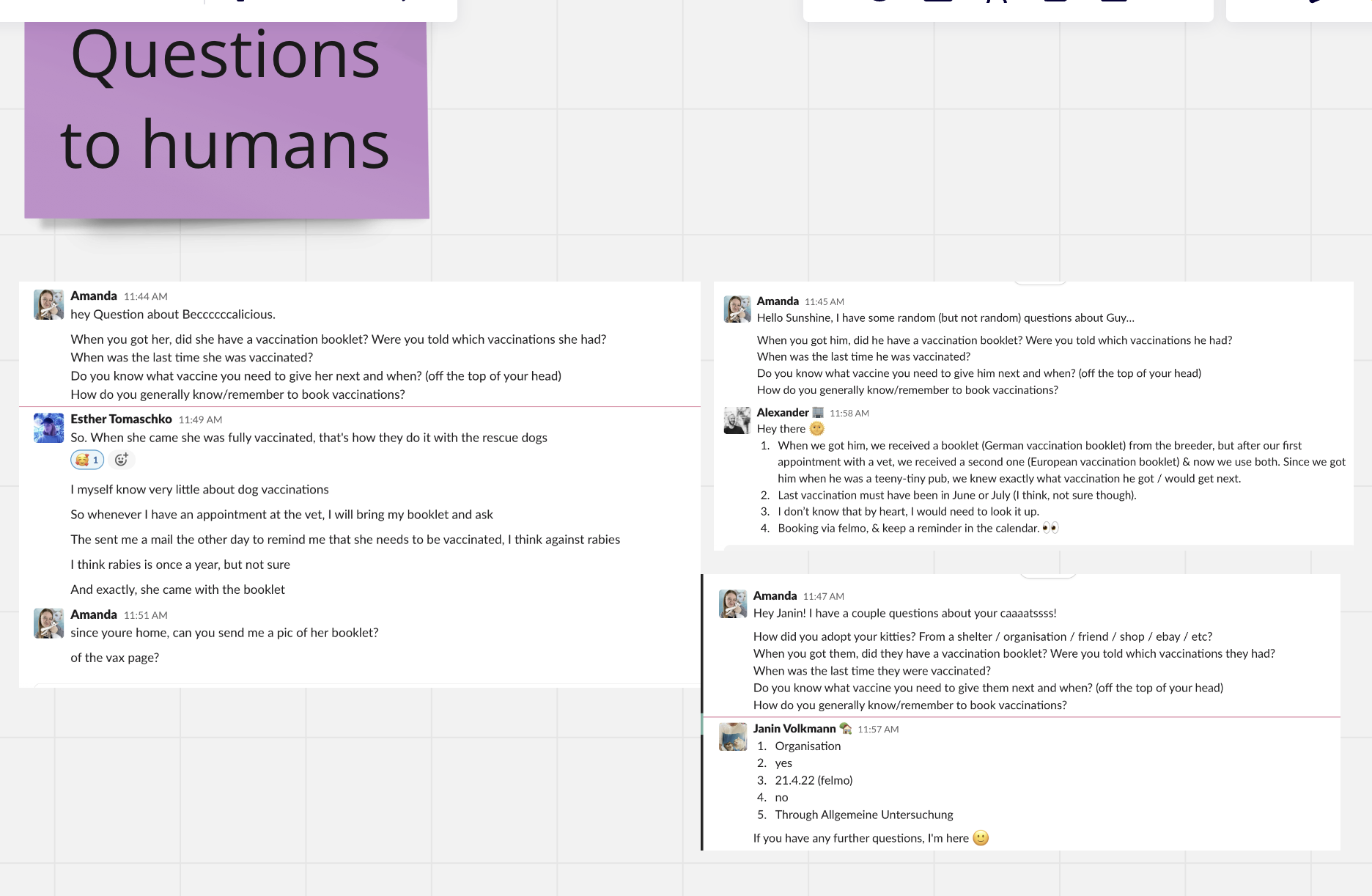
Main learnings:
- Rescue dogs & cats come fully vaccinated and with pet-passport or vax-book.
- My guess is that people don’t have a good overview of needed vaccines.
How people remember to book vaccines:
- Keep reminders in the calendar.
- During yearly checkups.
- Get a reminder card from vet.
At this point in the project, I realized that my own knowledge about vaccines, especially for dogs, was pretty much 0. I put on my smart glasses and spent a couple of days learning from both our in-house vets and the internet, everything I could about vaccinations in Germany. (I like to joke now that I’m BASICALLY a vet because of all my newfound knowledge).
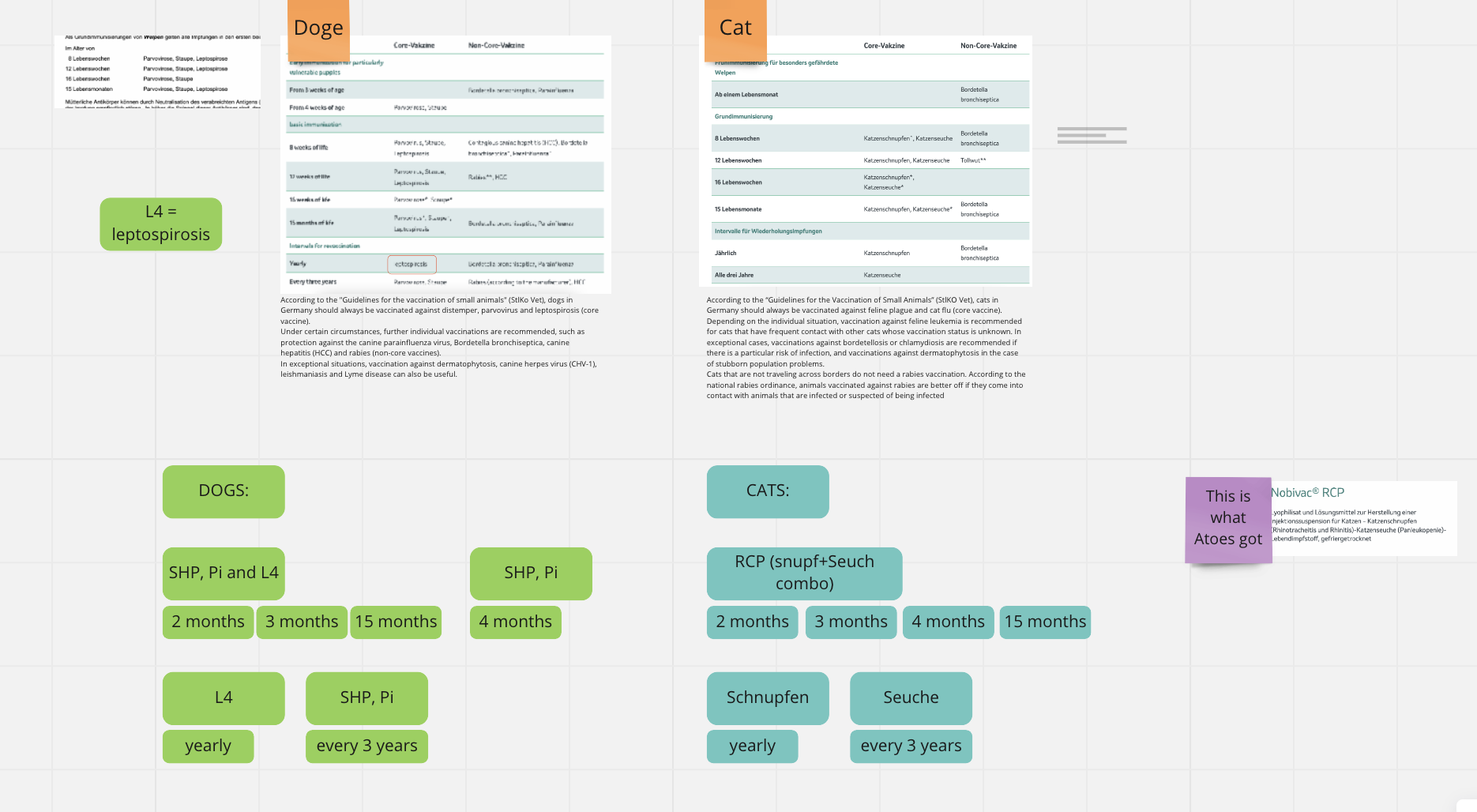
Basic immunisation: usually given when puppy, but can be given as adult. Needs multiple booster.
Booster immunisation: when the basic immunisation has occurred, a yearly to 3-yearly booster is required. The interval is determined by BRAND of vaccine, not vaccine itself.
Core vaccines: what all animals in Germany are recommended.
Additional vaccines: optional vaccines depending on the lifestyle of the animal. Some are more important than others.
Thanks for coming to my vaccine TED-talk.
3. First ideas and wireframes
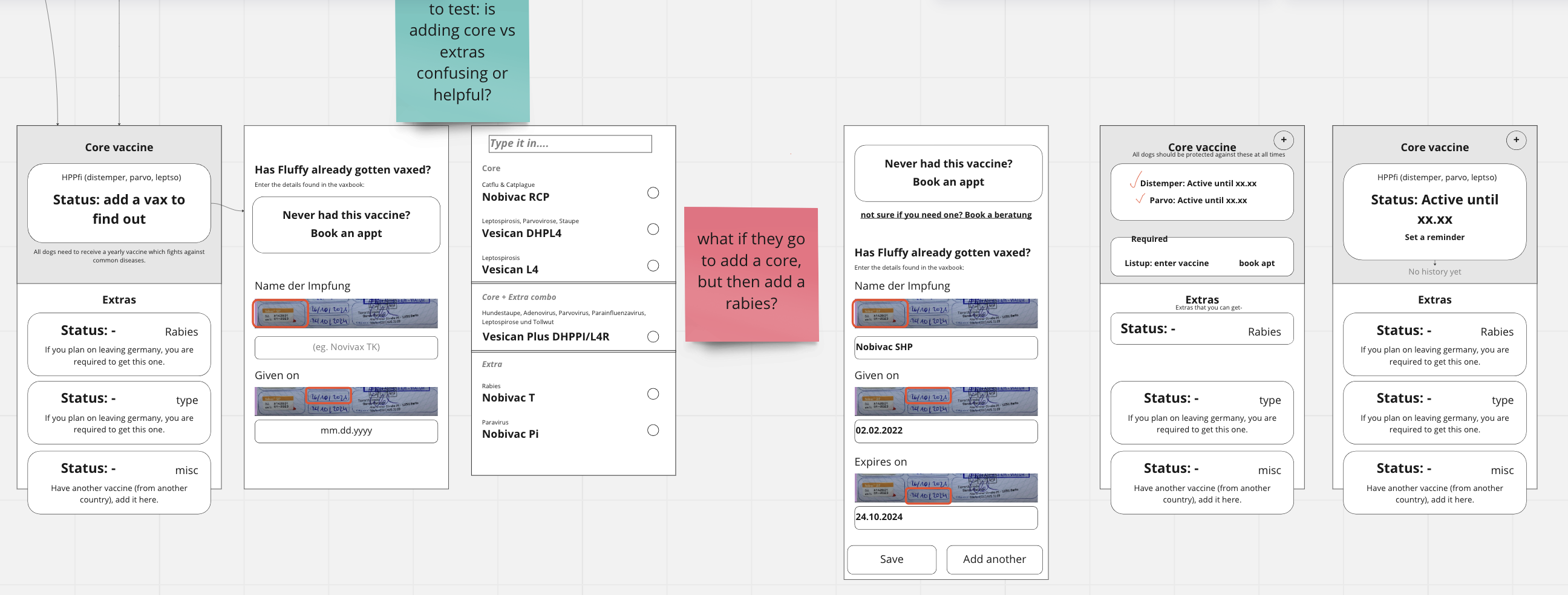
Now that I understand vaccinations better, I tried out a few wireframes. I like doing these in miro, so that all my research and exploration is in one place. Over the years, i’ve gotten quick at using miro for wireframes… so I prefer it even over hand-sketching.
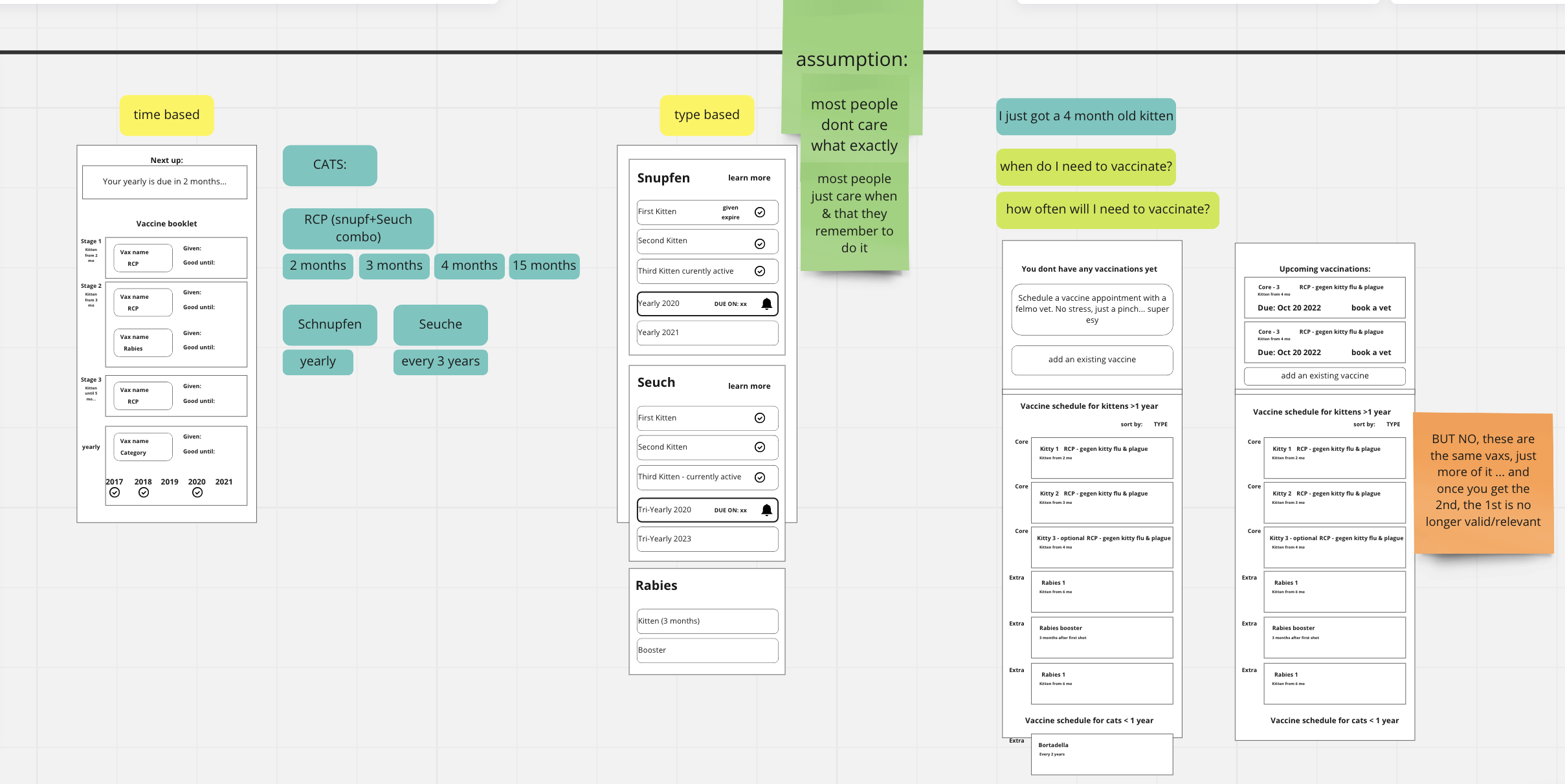
My initial two ideas were to show the vaccine as either a TIME-based or TYPE-based to-do.
- With the time-based approach, users would have an idea of how many vaccines they need and how often.
- With the type-based approach, users would see that their animal is either actively vaccinated or not against whatever disease it is.
In the end, the time-based approach would NOT work, since the time changes depending on manufacturer, and the vets dont always use the same brands as eachother.
I then took a step back and mapped out the flow in which users would add the vaccines. I rewrote and reframed the values that I had written earlier.
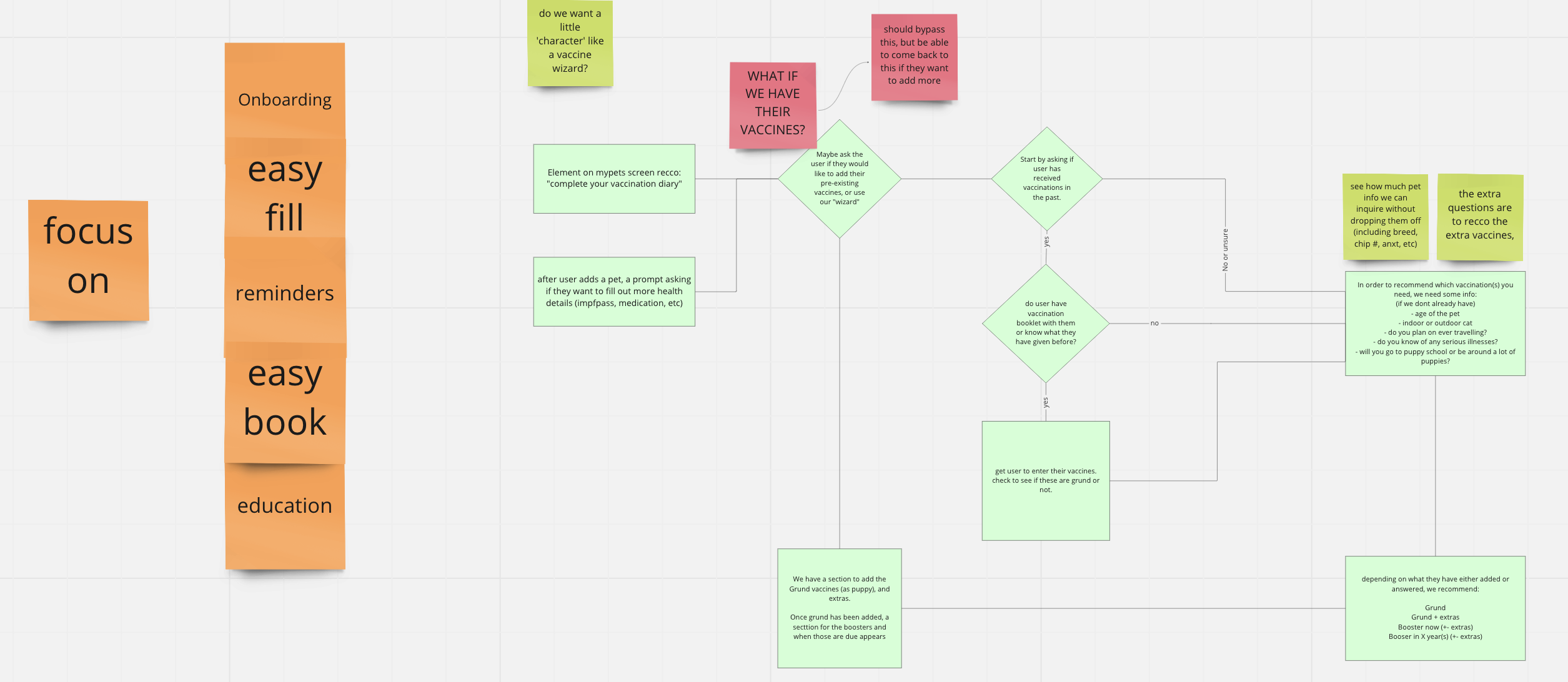
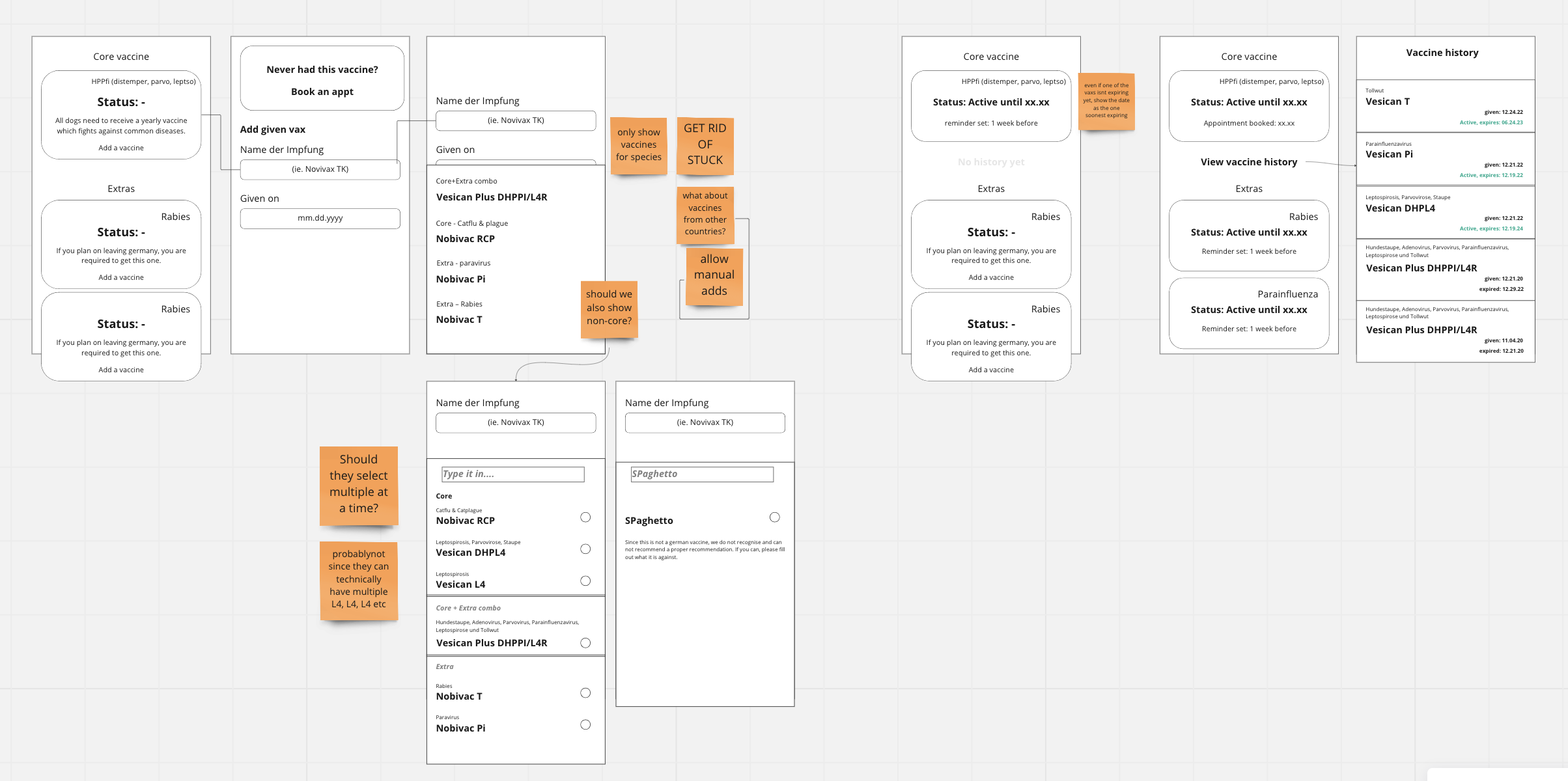
With this, I felt like I was getting CLOSE! I made a few more wireframes to flush out my idea, and with feedback from other product managers and designers, I narrowed down my wireframes even further.
Learnings so far:
- Users need to easily see if they are missing something (at the top of the page), and if so, they should be able to add things easily.
- Vaccine names DO NOT match the disease, so when adding a vaccine, we need to somehow tell people what it protects against…. but without adding confusion.
4. Refining the idea in figma
Finally… every designer’s favourite part of the process: figmaaaaaaaaaaaa! I do a little happy dance every time I can make a new feature page in our figma library.
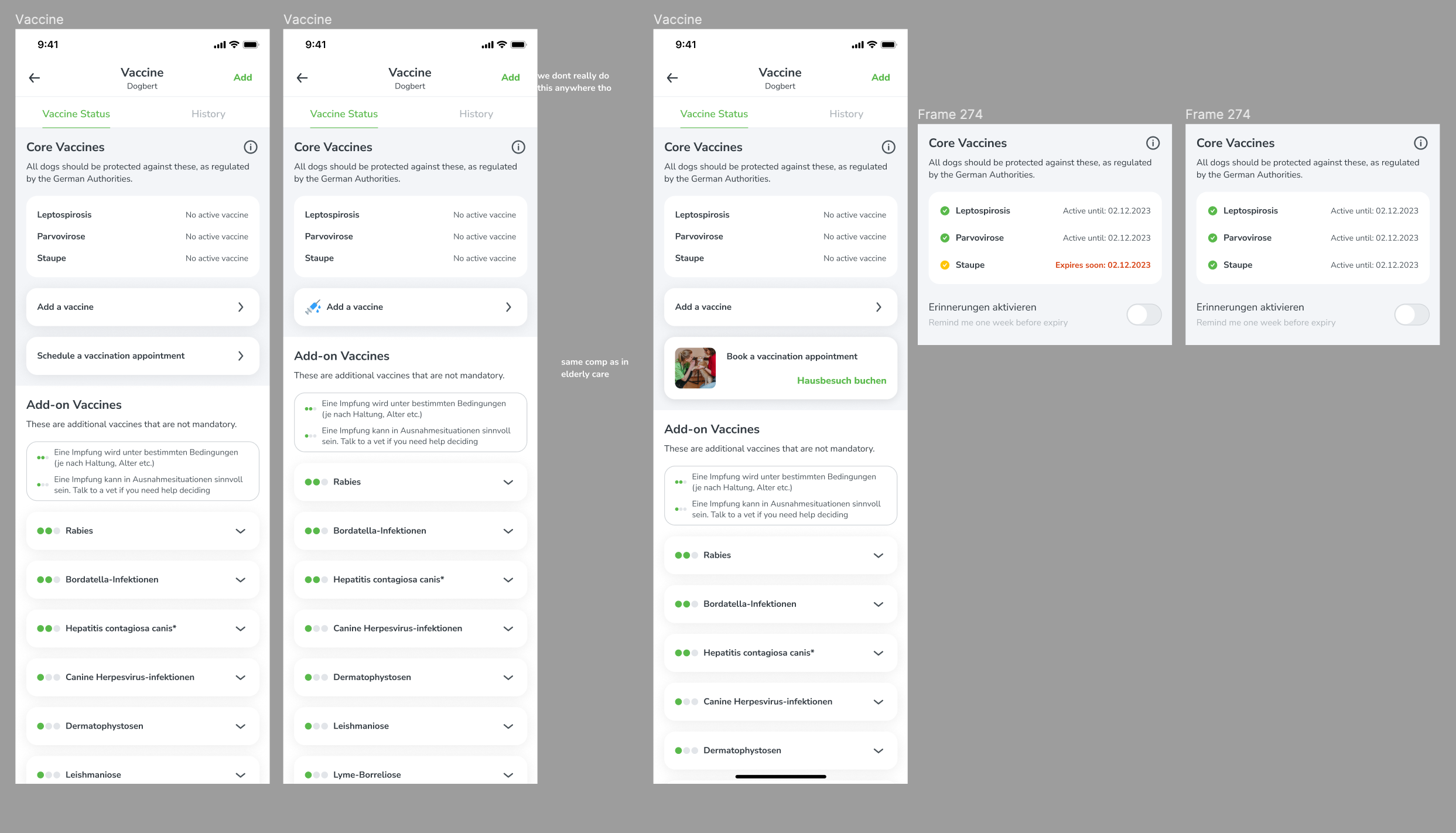
Using my wireframes, I started creating screens. I always skip the ‘high-fidelity’ wireframe stage… I don’t see any value other than getting stakeholder sign-off, and working with color does not slow me down. Although, at this stage, I am NOT focused on making clean and developer-ready files.
Iteration 1:
In this round of ideation, I added some “traffic light” indicators which I thought would be helpful to show users what is important and what is not.
WELL THIS IDEA WAS A FLOP. I showed it to a few people and it just made more confusion that help.
I took out the traffic lights, but felt like it was missing something…. so I decided to add little images of each of the diseases. I thought this would be a good idea to really reiterate that this is a DISEASE and not an actual vaccine.
Looking at these mocks, I questioned myself: why are the add-on vaccines visually different than the core vaccines? Since they are technically the same thing just with different priorities, shouldn’t they visually reflect that?
Iteration 2:
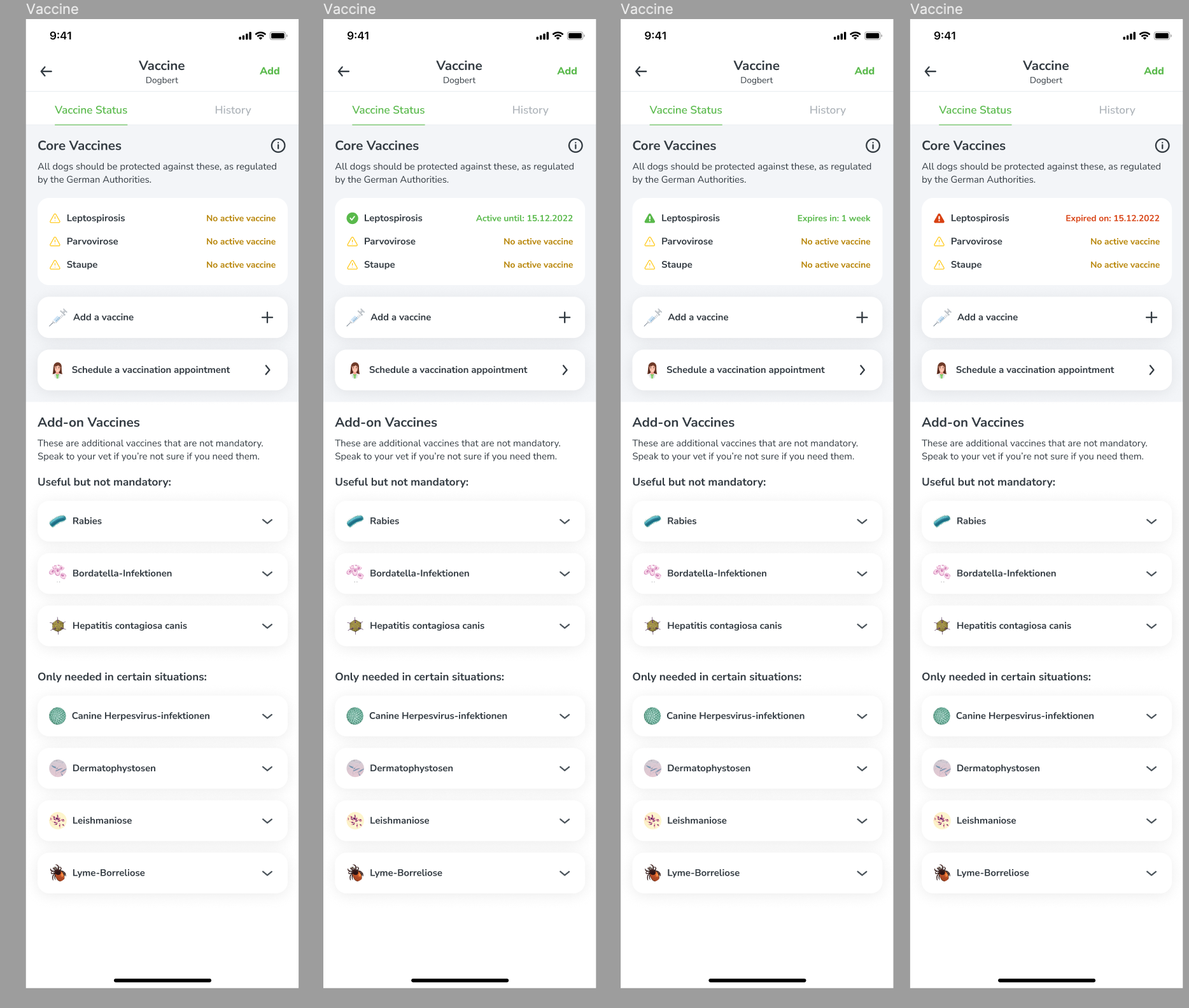
Next round of design: I made the core vaccines match the add-ons, and decided that we can use this opportunity to EDUCATE (because its a feature value) users on what each of the diseases are. I used my own research to write some content.
New flow: add a vaccine yourself
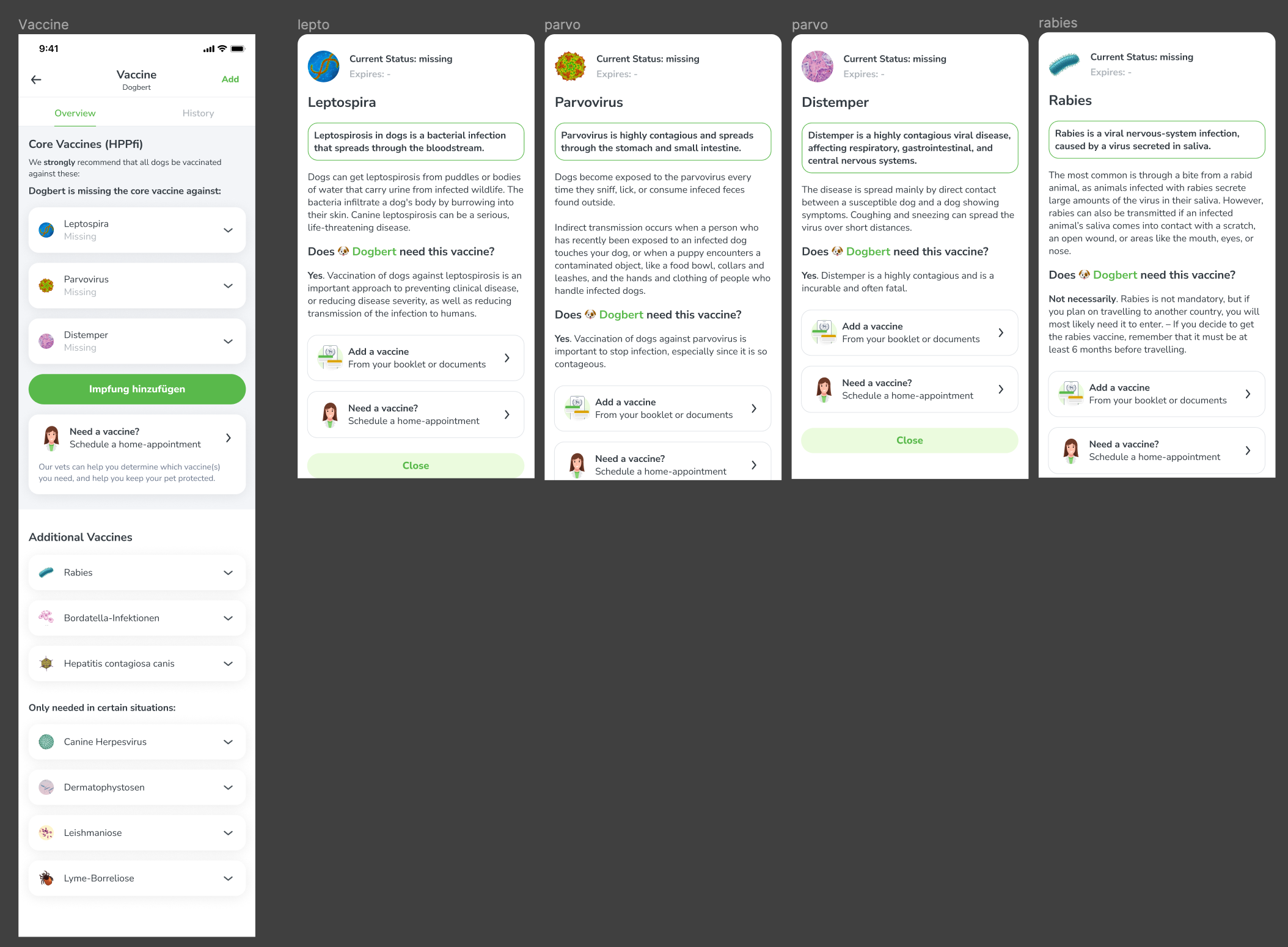
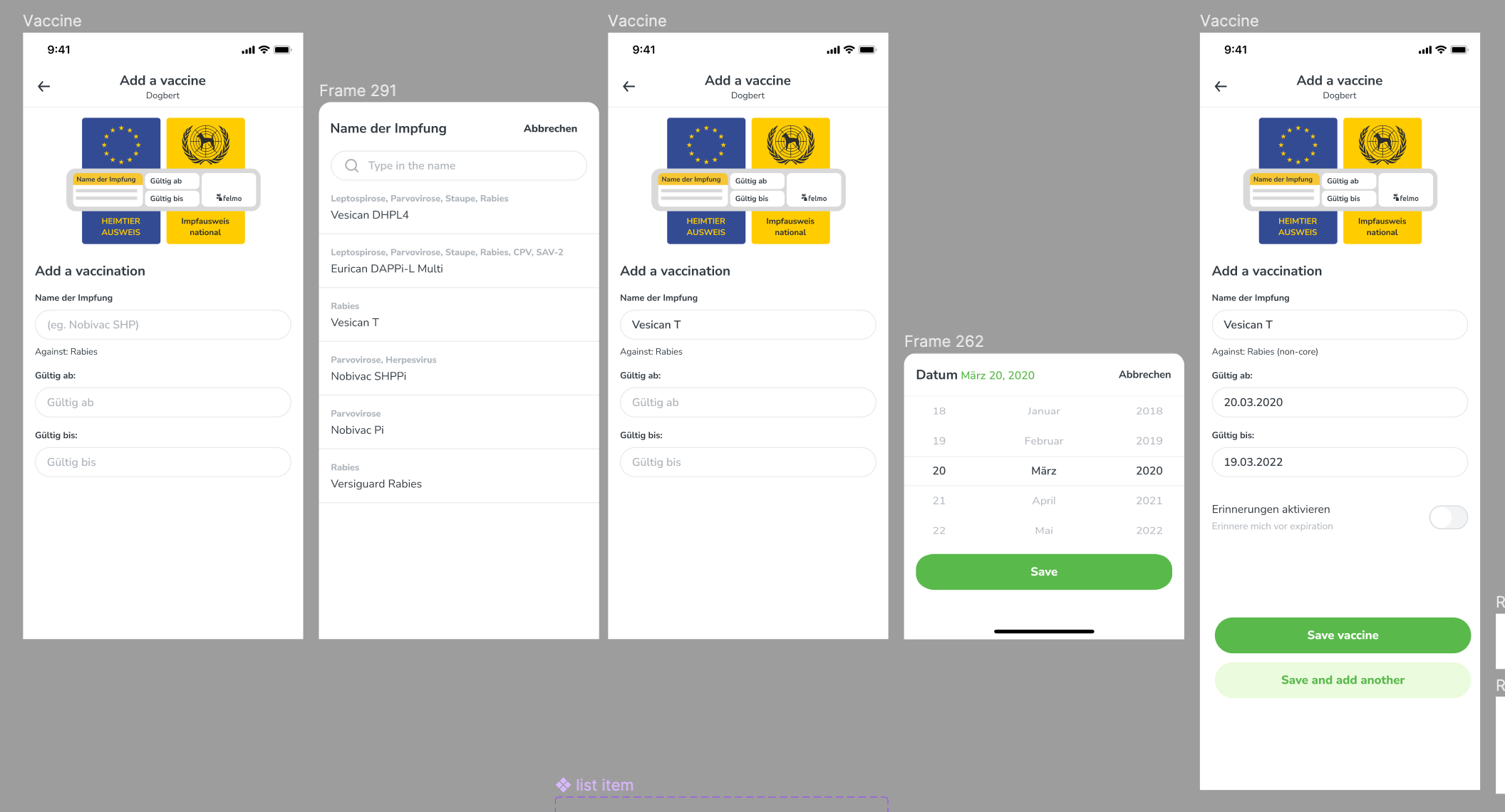
I took a quick break to focus on the ‘add an existing vaccine’ flow. First, I drew a little illustration that would indicate to users HOW they can add vaccines… specifically which information in their booklet is required.
In the app currently, we do NOT ask for the ‘good until’ field… so we do not know when a pet’s vaccine is expiring or expired. In order to send proper reminders, we need this information.
More testing more iterating
I took a step back and showed a few people the entire design so far. People liked it but felt like it was lacking SUCCESS. Again, I thought about my values and since guidance is important, I decided we need to add more encouraging copy or components to this feature.
The first thing the user will see at the top of this screen is a little prompt: either to add a vaccine, that they are fully vaccinated, OR that it’s expiring soon and a CTA to book an appointment.
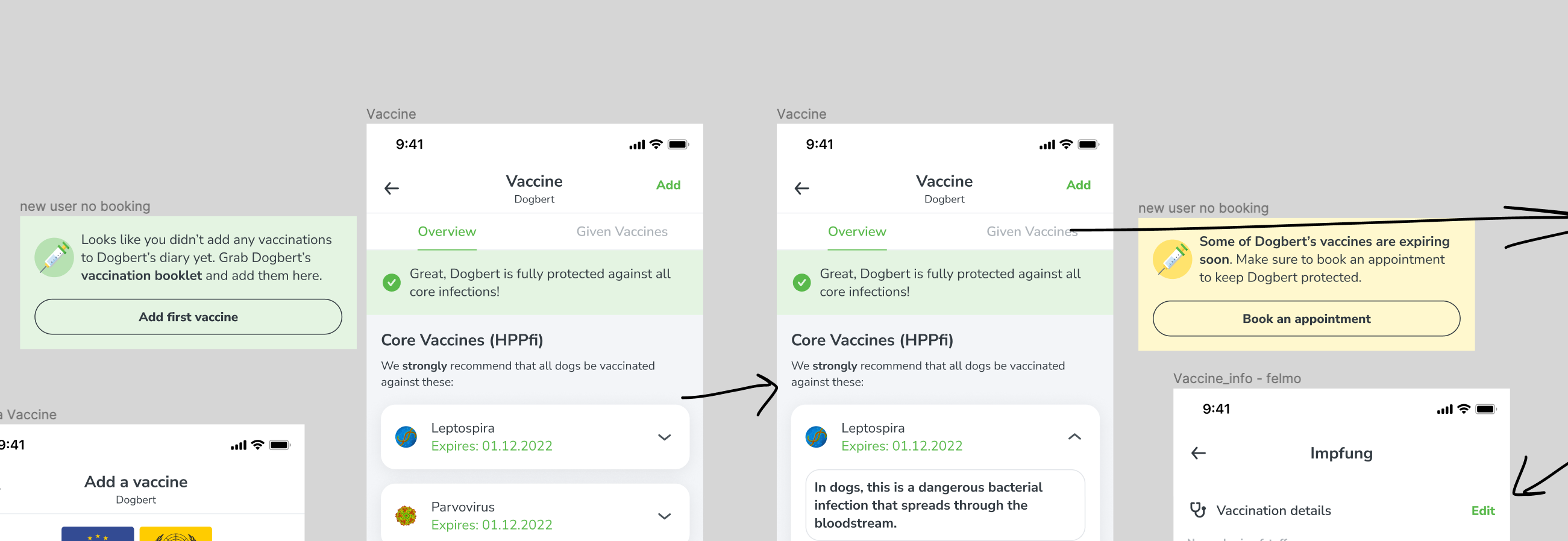
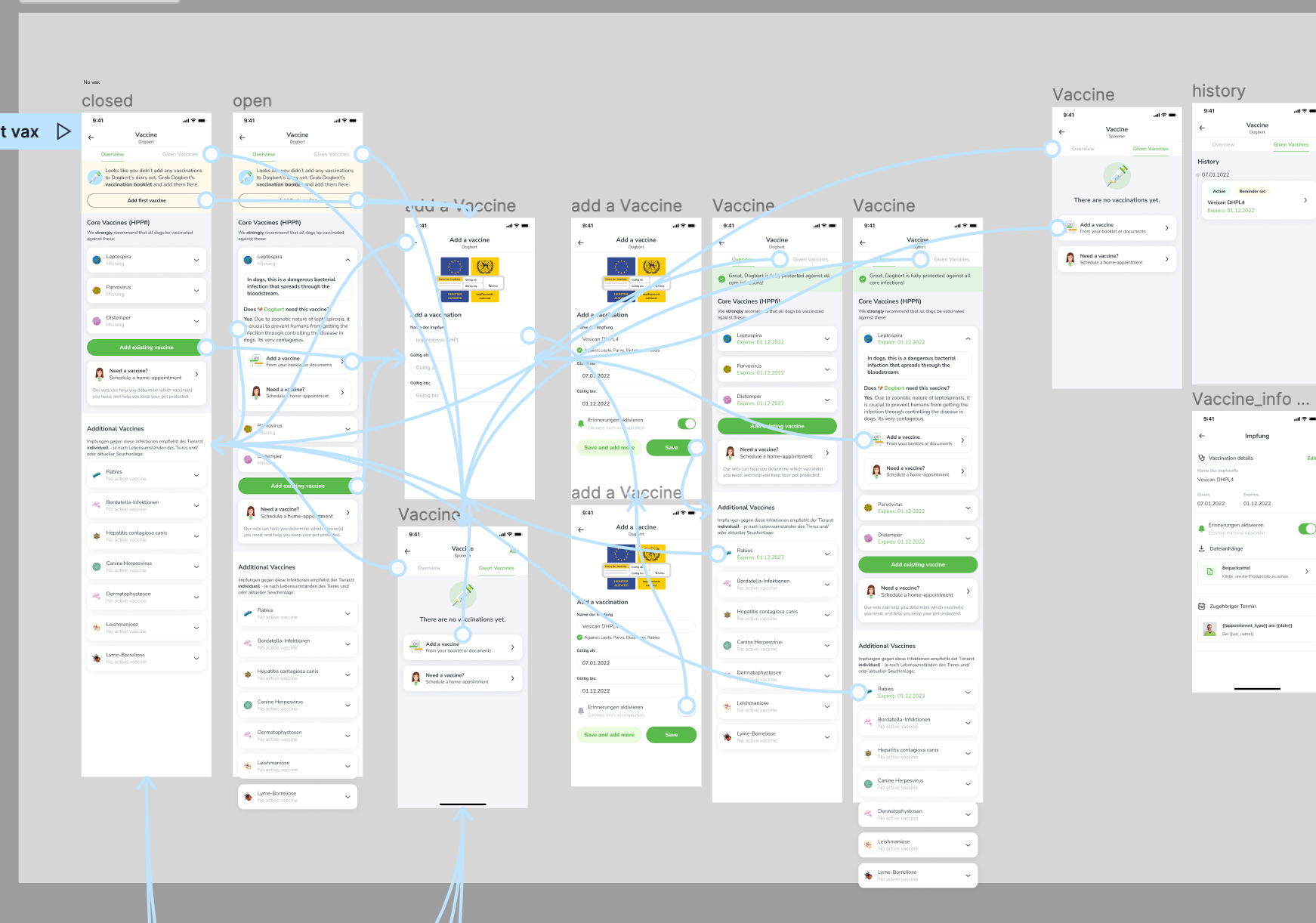
I created a prototype to start testing, and made a little script testing ‘adding a vaccine’ and ‘understanding the main screen’s content’
Also, here’s an obligatory screenshot of my blue-proto lines… just to prove that I am INDEED a real designer.
Feedback:
Person 1:
- Extremely clear, feels well guided, able to tell the difference between core and additional, likes the extra information in the carousels, adding a vax is easy.
- 10/10 no issues, likes the ‘add vaccine’ flow a lot
Person 2:
- Struggled a bit with understanding the info, but probably because they were excited and not listening to instructions and just kept clicking on the first CTA.
- After a while, understood the feature fine but was a bit overwhelmed at first.
- Thought the “schedule a vaccine” component was a chat.
Person 3:
- Extremely clear, not overwhelmed at all (repeated this a few times)
- Likes the distinction between core/additional, and having all the info laid out this way is straight forward. Also adding a vax is super easy and clear.
Person 4:
- Overwhelmed and not sure where to start/look/begin.
- Things there are too many CTAs… would remove the green button and replace the ‘add first vaccine’ component with a green cta button and text like “already vaccinated, add them here”
- The distinction between core and additional is clear. Also likes the ‘added’ state
Person 5:
- super clear first impression, makes sense the distinction between core and additional. Likes that we provide all this information.
- The copy for ‘add a vaccine’ button is confusing.,.. suggested saying ‘add existing vaccine’
- no problems adding a vax through the ctas, and thinks the ‘added’ state is super clear and really likes that we display dates.
The final product
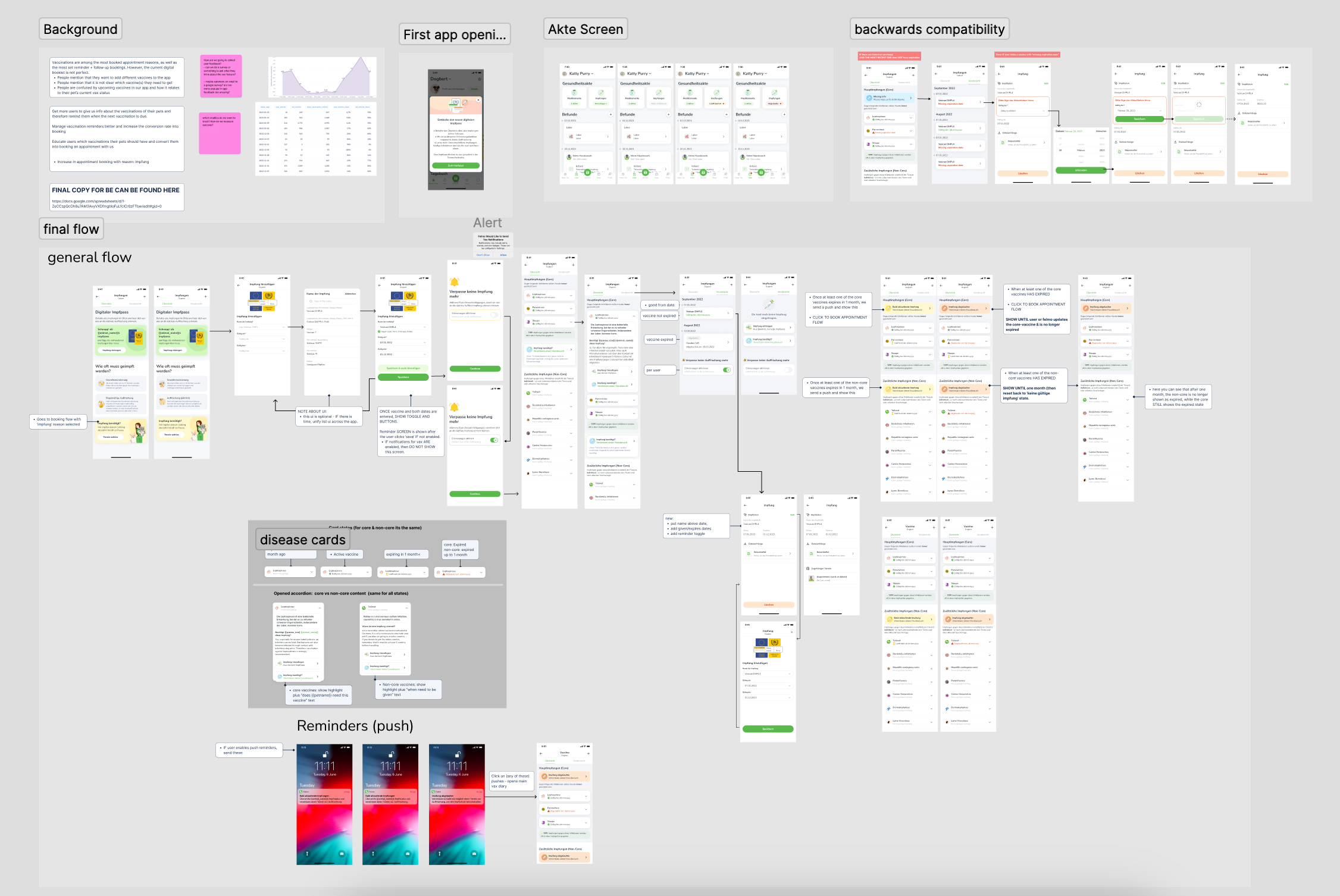
Obviously, zoomed-out screenshots suck and do nothing to show the small details, but I wanted to show an overview of what I delivered:
Including:
- Annotations and required tracking stats
- Final designs and copy divided into FE/BE
- Backward compatibility handling
- Push notifications & logic
- Edge cases
Quote from one of the React Native Developers:
“I actually love this feature. It seems complicated, but it’s actually really simple… it’s a complicated process that you made easy.”
In Conclusion / Learnings:
Internal testing is still valuable:
- I really wanted to test with REAL users, but it wasn’t feasable. Instead of getting stressed about that, I realised that IT IS OKAY to do user tests in the office with coworkers. They are still users and it doesnt make the test any less valid because I know them.
Nothing is ever 100% perfect:
- Vaccines are complicated, and you cant make EVERYONE happy. Some users are going to be confused, and thats okay.
Never skip the process:
- Spending longer on wireframes than I normally do helped me have a clearer picture in my mind of what could and wouldn’t work.
Test test & test to catch your biases:
- Just because I think something is bad UX doesn’t mean it actually is. Hence, testing almost daily is important so that I don’t get stuck in silos